
A guide you can scroll
See what's on right now with a progress bar, what comes next, and a short description for each show, just like the guide on a cable box.
MoaTV app or Moa TV app, people search for it both ways. It's where everything lives: the live guide, films and series, sports replays and pay-per-view. Here's a tour, and how to get it on your screen.
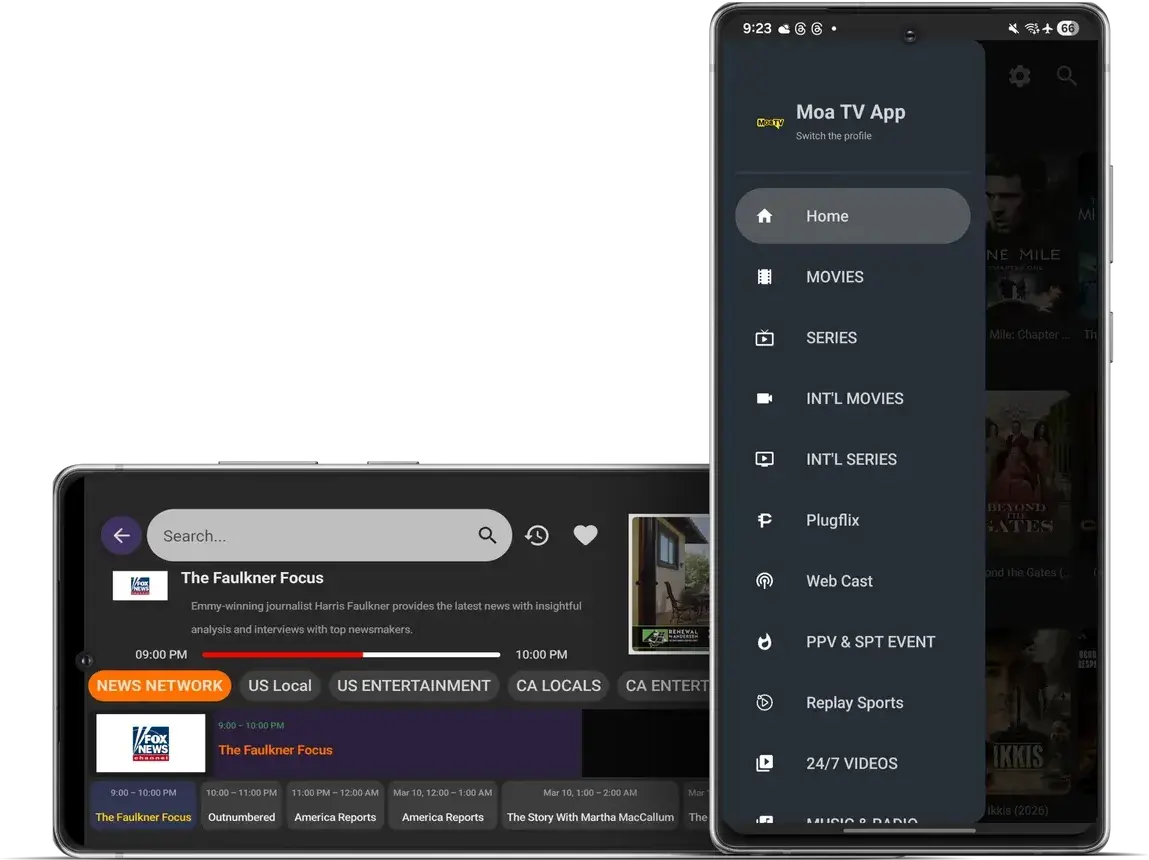
See what's on right now with a progress bar, what comes next, and a short description for each show, just like the guide on a cable box.
Movies, Series, International Movies and International Series each have their own menu, so the on-demand library never clutters live TV.
PPV & Sports Events collects the big one-off events, and Replay Sports keeps recent games ready to play.
Switch profiles so your favourites don't end up sitting between the kids' cartoons.
Look up a channel or title by name, jump back to the last thing you watched, and star the channels you use every day.
Open the menu and every corner of MoaTV is listed. Live channels are grouped into News, US Local, US Entertainment, CA Locals, CA Entertainment and more, which is why finding a channel takes seconds instead of minutes. The MoaTV channels list explains each group.
Fire TV owners: the MoaTV Firestick guide is the quickest route. Everyone else, pick your device below.
On a Fire TV Stick or Android TV, install the free Downloader app and enter the Downloader code we send you on WhatsApp with your login. On a phone, smart TV or computer, the player comes from that device's own app store. The MoaTV setup guide covers each one.
Downloading it costs nothing. Watching needs an active MoaTV plan, which gives you the login for the app.
Yes. Install it on every screen you like and sign in with the same details. Your plan decides how many can play at once, up to 5.
The app runs anywhere with a good connection, though the lineup and guide are built around North American viewers.
The app is free. Choose a plan and we'll send the login that unlocks it.